Getting paid is one of the most important parts of running your shop.
Here’s exactly how it works and where to check if you ever have questions about your payout.
How payments flow
When a customer visits your shop and places an order, the payment does not go to Big Cartel.
It goes directly to your connected payment processor:
From there:
- The processor deducts its transaction fee
- The remaining funds are sent to your bank account based on your payout schedule.
Big Cartel does not hold your funds.
Your payout timing depends entirely on whether you’re using Stripe or PayPal.
If you notice a partner fee or application fee label in Stripe or PayPal, this is how the processor labels fees related to Big Cartel’s automated US sales tax collection and remittance feature. It is not an additional transaction fee for normal payment processing.
You can learn more about how US sales tax is collected and remitted in our sales tax help article.
How to View a Payment from an Order
If you ever need to check where a payment is, you can jump directly to it from the Big Cartel admin.
To see payment details for a specific order:
- Go to your Orders tab in your Big Cartel admin.
- Click on the order.
- Scroll to the Payment section.
- Click:
- View in Stripe,
- or View in PayPal

You’ll be redirected to your Stripe or PayPal dashboard to see full transaction details, payout status, and fees.
Using Stripe
Where the money goes
If a customer pays with:
- Credit or debit card
- Apple Pay
- Google Pay
- Afterpay (if enabled)
The funds go into your Stripe balance first.
They do not go straight to your bank immediately.
When do I get paid from Stripe?
Stripe sends payouts to your connected bank account based on your payout schedule.
Most sellers use automatic payouts, which means Stripe transfers funds without you needing to do anything.
To check your payouts:
Log in to your Stripe dashboard:
Click Transactions to see payments from your shop.
Click the Payouts tab to see:
- Your available balance
- Pending funds
- Upcoming payout dates
- Deposit history
This is where you’ll see exactly when your money is expected to arrive.
Managing your Stripe payout settings
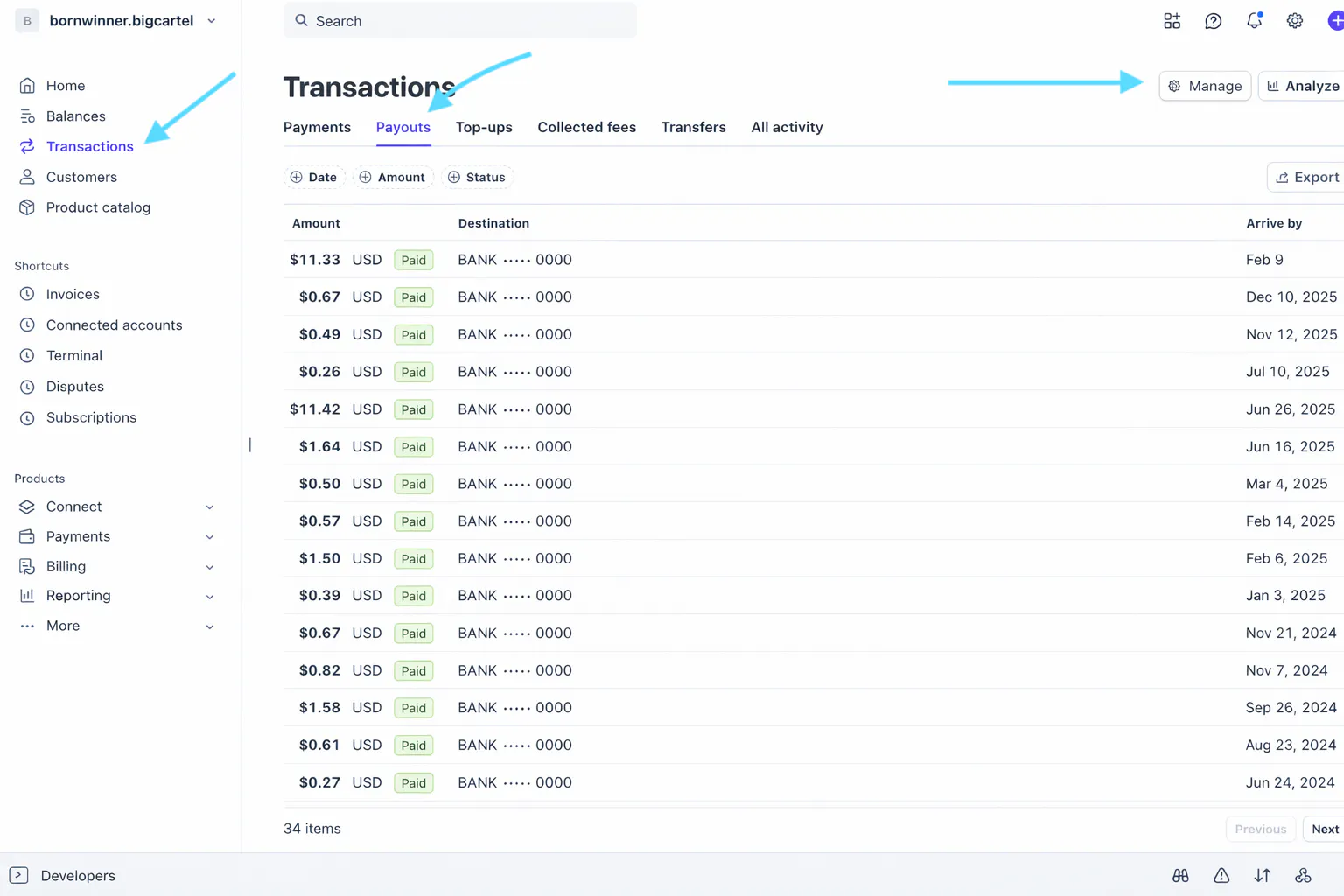
In the Payouts tab, click Manage.
Here you can:
- Confirm your bank account details
- Update banking information
- Change your payout schedule
Stripe payout options include:
Automatic payouts (recommended)
- Daily
- Weekly
- Monthly
Or, Manual payouts, where you trigger deposits yourself.
We recommend automatic payouts so transfers happen consistently without extra steps.
Why might Stripe payouts be delayed?
Occasionally, payouts may take longer than expected.
This can happen if:
- Your account is new
- There’s a dispute or chargeback
- There’s unusual processing activity
- Your account is under review
- Payout schedules vary depending on the country where your Stripe account is registered
Stripe manages all payout timing and security checks directly.
More information on Stripe payout timing:
https://support.stripe.com/questions/payout-schedules-faq
Country-specific payout schedules:

Stripe fees
Stripe deducts processing fees before funds reach your bank.
Typical US rate:
2.9% + 30¢ per transaction
Rates vary by country and payment method.
You can view your exact pricing here: https://stripe.com/pricing
Using PayPal
Where the money goes
If a customer pays with:
- PayPal balance
- Credit or debit card via PayPal
- Pay Later options
The funds go directly into your PayPal account balance.
When do I get paid from PayPal?
Unlike Stripe, PayPal does not automatically send funds to your bank unless you’ve set up auto-transfers.
You have two options:
- Keep funds in your PayPal balance
- Manually transfer funds to your bank
Standard bank transfers typically take 1–3 business days.
Instant transfers are available for a fee.
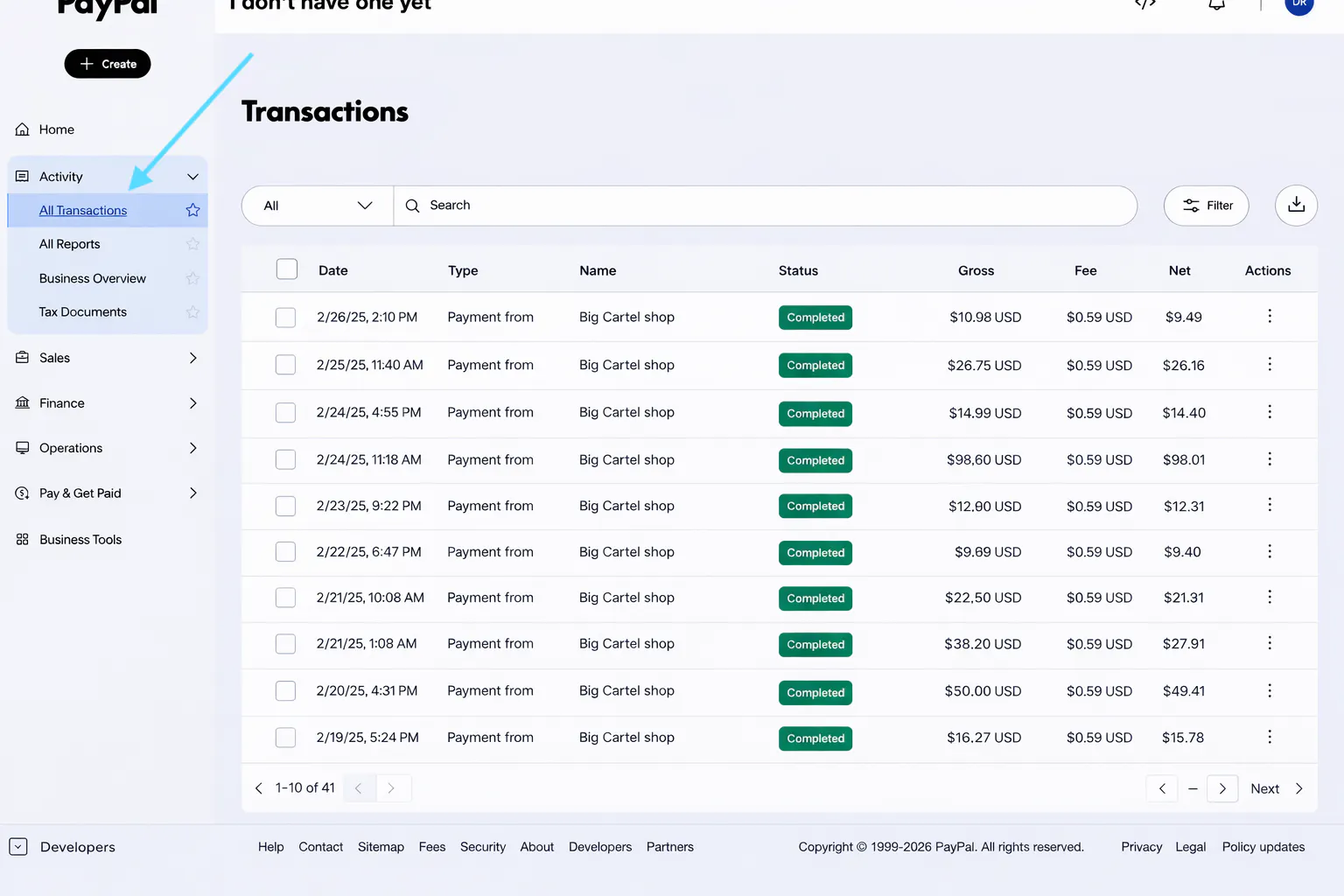
How to check transactions in PayPal
Log in here: https://www.paypal.com/mep/dashboard
Go to Activity.
Click All Transactions to view payments from your shop.
To check your balance and bank information:
- Click Pay & Get Paid
- Select Money
You’ll see:
- Available balance
- Linked bank accounts
This is where you can confirm where your funds will be sent.
PayPal holds and reserves
PayPal may place funds on hold in certain situations.
This is most common if:
- You’re a new seller
- You sell higher-risk products
- There’s unusual activity
- A dispute is opened
Common hold timelines include:
- Up to 21 days
- Until tracking confirms delivery
- Until the buyer confirms receipt
All holds and reviews are managed directly by PayPal.
PayPal fees
PayPal deducts processing fees before funds become available.
Fees vary based on:
- Country
- Payment type
- Cross-border transactions
You can see the fee breakdown inside your PayPal account for each transaction.
Using Both Stripe and PayPal
If both are enabled:
Card payments go to Stripe.
PayPal payments go to PayPal.
You’ll receive two separate payouts based on each processor’s schedule.
To track everything, you’ll need to log into each processor separately.
Final takeaway
If you’re wondering when you’ll get paid, the answer always lives inside your Stripe or PayPal dashboard.
Big Cartel connects your checkout but your processor handles your funds.
Checking your payout tab is the fastest way to see:
- What’s available
- What’s pending
- And when your deposit is expected